skip to main |
skip to sidebar
One of the features in Vmware Infrastructre that was missing in Hyper-V was over-provisioning of memory resources which is also known as memory overcommitment. A leaked screenshot from Softpedia shows that the dynamic memory management features is about to be included in the next Windows 2008 build.
http://news.softpedia.com/news/The-Windows-8-Start-Post-RTM-Windows-7-Build-6-1-7700-0-100122-1900-133746.shtml
Microsoft internals just released a tool called nvsbind. For our mass deployments I was using a powershell script which I wrote in order to change network bindings on specific interfaces (disable IPv6,File and Printer sharing etc..)This really requires lots of effort.(fetching registry hive,modfying it making queries to Inetcfg classes etc..)
With this tool it is now possible to make this via CLI. It can also change NIC binding order for specific protocols.
http://code.msdn.microsoft.com/nvspbind
Parameters are as below:
C:\>nvspbind /?
Hyper-V Network VSP Bind Application 6.1.7690.0.
Copyright (c) Microsoft Corporation. All rights reserved.
Usage: nvspbind [option] [NIC|*] [protocol|*]
Options:
/n display NIC information only
/u unbind switch protocol from specified nic(s)
/b bind switch protocol to specified nic(s)
/d disable binding of specified protocol from specified nic(s)
/e enable binding of specified protocol to specified nic(s)
/r repair bindings on specified nic(s)
/o show NIC order for specified protocol
/+ move specified NIC up in binding order for specified protocol
/- move specified NIC down in binding order for specified protocol
Most options are documented in the readme which downloads with the install.
The NIC connection order options (o, + and -) show the NIC connection order, move NICs up and move NICs down.
Project Sikuli is a new automation scripting language developed by MIT students. This new development environment uses image recognition for processesing. So you can say click on this image on the screen then type this etc.. The syntax look like Python and the IDE is based on Java. So any machine with JRE can run this. I'm really planning to do some server side test case automation based on this new language. If you check the project site even the 0.9.7 release contains lots of features. For more information check :
http://sikuli.org/
For examples (especially the bejeweled bot shows the skills of this new IDE):
http://groups.csail.mit.edu/uid/sikuli/demo.shtml
We were getting error 0x80041002 while adding host to a NLB cluster. After making some research I recognised that apart from being a NLB specific error this was related with WMI repositories.
As we started to have this error after a power failure, recreating WMI repositories made sense. In order to fix this error :
- Stop WMI service.
- Move contents of %windir%\system32\wbem\repository to a temp folder (if Windows doesnt allow do this in safe mode)
- Go to command prompt. Under %windir%\system32\webm execute :
mofcomp cimwin32.mof
mofcomp wlbsprov.mof
mofcomp nlbmprov.mof
- Start the WMI service and try the NLB operation again.
If you receive the below error during the installation of Hyper-V role :
"Server manager has detected that the processor on this computer is not compatible with Hyper-V. To install this roll, the processor must have a supported version of hardware-assisted virtualization and that feature must be turned on in the BIOS."
First make sure you have Hardware Assisted Virtualization and DEP turned on BIOS. If you still see this error message after enabling those roles make sure you didn't enable the role using :
start /w ocsetup Microsoft-Hyper-V
If so you need to first uninstall it (start /w ocsetup Microsoft-Hyper-V /uninstall) then install using the GUI (Server Manager -> Add Roles)
I'm using ECLIPSE as the Perl editor on my Windows machine together with EPIC Perl. If I copy/paste sample code from Perl books I get the error :
Save could not be completed.
Reason:
Some characters cannot be mapped using "Cp1254" character encoding.
Either change the encoding or remove the characters which are not supported by the "Cp1254" character encoding..
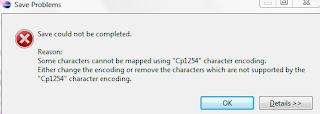 In order to overcome this problem go Window > Preferences > General > Content Types > Text > Perl Source Files > Default Encoding and make it UTF-8


