Showing posts with label Security. Show all posts

Tuesday, February 9, 2010

Vulnerability in Windows Server 2008 Hyper-V Could Allow Denial of Service - 977894

A new security bulletin by Microsoft has been published today. This DoS vulnerability effects the x64 editions of Windows 2008 and R2 including the Core installations.
http://www.microsoft.com/technet/security/Bulletin/MS10-010.mspx
This security update resolves a privately reported vulnerability in Windows Server 2008 Hyper-V and Windows Server 2008 R2 Hyper-V. The vulnerability could allow denial of service if a malformed sequence of machine instructions is run by an authenticated user in one of the guest virtual machines hosted by the Hyper-V server. An attacker must have valid logon credentials and be able to log on locally into a guest virtual machine to exploit this vulnerability. The vulnerability could not be exploited remotely or by anonymous users.

Friday, August 28, 2009

The battle of hypervisor footprints

Microsoft's stance against the statement in Vmware's official site saying Hyper-V has a bigger footprint then ESXi :

http://blogs.technet.com/virtualization/archive/2009/08/12/hypervisor-footprint-debate-part-1-microsoft-hyper-v-server-2008-vmware-esxi-3-5.aspx

http://blogs.technet.com/virtualization/archive/2009/08/14/hypervisor-footprint-debate-part-2-windows-server-2008-hyper-v-vmware-esx-3-5.aspx

http://blogs.technet.com/virtualization/archive/2009/08/17/hypervisor-footprint-debate-part-3-windows-server-2008-hyper-v-vmware-esxi-3-5.aspx

      Hyper-V Server 2008 vs ESXi 3.5 | June 2008 - June 2009
      Hyper-V: 82MB footprint increase with 26 patches
      ESXi: 2.7GB footprint increases with 13 patches
    Windows Server 2008 Hyper-V vs ESX 3.5 | January 2008 - June 2009
      Hyper-V: 408MB footprint increase with 32 patches
      ESX: 3GB footprint increases with 85 patches
    Windows Server 2008 Hyper-V vs ESXi 3.5 | January 2008 - June 2009
      Hyper-V: 408MB footprint increase with 32 patches
      ESX: 2.7GB footprint increases with 13 patches

and now Vmware's official reply :

I'm leaving the final decision to you :)

Thursday, August 20, 2009

Required Local OS Firewall Rules for SCVMM and Hyper-V Host Communication

Communication Details For HyperV&SCVMM

In order to manage HyperV Hosts using SCVMM below ports/protocols should be open on the firewall.

VMM Server

80 (HTTP, WS-MAN)
443 (HTTPS, BITS)
8100 (WCF Connections to PowerShell or Admin Console)

SQL Server

1433 (Remote SQL instance connection)
1434 (SQL browser service) - only needed for initial setup

Host / Library

80 (HTTP, WS-MAN)
443 (HTTPS, BITS)
3389 (RDP)
2179 (VMConnect on Hyper-V hosts for single-class console view)5900 (VMRC on Virtual Server hosts)

The list of all ports and protocols can be found in the official MS document :

http://technet.microsoft.com/en-us/library/cc764268.aspx

Most of the FW rules above has been created by the SCVMM Installer and the role setup wizard for IIS,HyperV.

Additionally during the deployment of the SCVMM agent on the HyperV host the SMB-IN 445 should be available on HyperV host because the Agent Installer file has been moved to the ADMIN$ share of the HyperV host.

Necessary Configuration For Remote Management

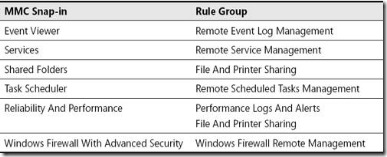
General Rule Groups You Must Enable in Windows Firewall to Allow Remote Management by an MMC Snap-in
clip_image002

In order to manage HyperV hosts remotely enable the below rule groups :

netsh advfirewall firewall set rule group="Windows Firewall Remote Management" new enable=yes

netsh advfirewall firewall set rule group=" Remote Administration" new enable=yes

For Device Manager apart from the rulegroups above you need to enable the GPO for :

Allow remote access to the PnP interface

For Disk Manager :

Make sure VDS service is running and enabled on startup. Also enable the below rule :

netsh advfirewall firewall set rule group=" Remote Volume Management" new enable=yes

Also in order to make HP System Management Homepage available enable TCP port 2381 on Hyper Host inbound rules.

Summary of Local Firewall Rules 

Below images shows all rules enabled on SCVMM and HyperV host to make remote management possible. The default Outbound rule for all profiles is “Allowed”. That’s why only INBOUND rules has been placed inside the document.

SCVMM Input :

scvmmfwin

Hyper-V Input :

 hypervfwin