We were getting error 0x80041002 while adding host to a NLB cluster. After making some research I recognised that apart from being a NLB specific error this was related with WMI repositories.
As we started to have this error after a power failure, recreating WMI repositories made sense. In order to fix this error :
- Stop WMI service.
- Move contents of %windir%\system32\wbem\repository to a temp folder (if Windows doesnt allow do this in safe mode)
- Go to command prompt. Under %windir%\system32\webm execute :
mofcomp cimwin32.mof
mofcomp wlbsprov.mof
mofcomp nlbmprov.mof
- Start the WMI service and try the NLB operation again.
Monday, January 25, 2010

Monday, December 28, 2009
"Server manager has detected that the processor on this computer is not compatible with Hyper-V" Error While Enabling Hyper-V Role
If you receive the below error during the installation of Hyper-V role :
"Server manager has detected that the processor on this computer is not compatible with Hyper-V. To install this roll, the processor must have a supported version of hardware-assisted virtualization and that feature must be turned on in the BIOS."
First make sure you have Hardware Assisted Virtualization and DEP turned on BIOS. If you still see this error message after enabling those roles make sure you didn't enable the role using :
start /w ocsetup Microsoft-Hyper-V
If so you need to first uninstall it (start /w ocsetup Microsoft-Hyper-V /uninstall) then install using the GUI (Server Manager -> Add Roles)
"Server manager has detected that the processor on this computer is not compatible with Hyper-V. To install this roll, the processor must have a supported version of hardware-assisted virtualization and that feature must be turned on in the BIOS."
First make sure you have Hardware Assisted Virtualization and DEP turned on BIOS. If you still see this error message after enabling those roles make sure you didn't enable the role using :
start /w ocsetup Microsoft-Hyper-V
If so you need to first uninstall it (start /w ocsetup Microsoft-Hyper-V /uninstall) then install using the GUI (Server Manager -> Add Roles)
Monday, December 14, 2009
Redhat Virtual Experience 2009
Redhat Virtual Experience 2009 online convention is available for replay :
http://www-2.virtualevents365.com/rhexp/
http://www-2.virtualevents365.com/rhexp/
Saturday, December 5, 2009
Eclipse Character Set Problem During Save
I'm using ECLIPSE as the Perl editor on my Windows machine together with EPIC Perl. If I copy/paste sample code from Perl books I get the error :
Save could not be completed.
Reason:
Some characters cannot be mapped using "Cp1254" character encoding.
Either change the encoding or remove the characters which are not supported by the "Cp1254" character encoding..
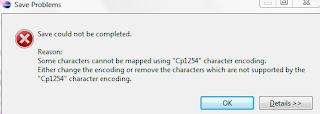
In order to overcome this problem go Window > Preferences > General > Content Types > Text > Perl Source Files > Default Encoding and make it UTF-8
Save could not be completed.
Reason:
Some characters cannot be mapped using "Cp1254" character encoding.
Either change the encoding or remove the characters which are not supported by the "Cp1254" character encoding..

In order to overcome this problem go Window > Preferences > General > Content Types > Text > Perl Source Files > Default Encoding and make it UTF-8
Tuesday, December 1, 2009
How to see the path of a process that's listening on specific port
From time to time you can have multiple instances of Apache installed on your server. As ps aux only shows the entire path, if you started the process using full path convention; you need to check /proc presudo file system to gather path information for the process. I generally use the below one liner to fetch this info :
It uses netstat to gather process ID for specific port (also lsof can be used) then checks the /proc/$PROCESS_ID/exe soft link to see where the process resides.
[root@VM1 bin]# ls -altr /proc/`netstat -natp | grep 80 | awk '{print $7}' | awk -F/ '{print $1}'`/exe
lrwxrwxrwx 1 root root 0 Nov 30 13:03 /proc/25316/exe -> /apache_test/bin/httpd
Saturday, November 21, 2009
How to increase the Logging Level of NFSD
NFS Server logging is by default very good, but in case you need more logging for deeper inspection you can use :
echo 32767 > /proc/sys/sunrpc/nfsd_debug
echo 32767 > /proc/sys/sunrpc/rpc_debug
And for the client side use :
echo 32767 > /proc/sys/sunrpc/nfs_debugIn order to return back to old debugging level use :
echo 0 > /proc/sys/sunrpc/nfsd_debug
echo 0 > /proc/sys/sunrpc/rpc_debug
echo 0 > /proc/sys/sunrpc/nfs_debug
Sunday, November 15, 2009
Master Certificate in Experts-Exchange
I really find Experts-Exchange a great way of challenging yourself for different problems then you have in your daily job. As I contribute in various areas, I could finally got enough points to get Master Certificate. Next target is Guru ;-)
Subscribe to:
Posts (Atom)
